> For the complete documentation index, see [llms.txt](https://gitbook.humanode.io/biodefi/llms.txt). Markdown versions of documentation pages are available by appending `.md` to page URLs; this page is available as [Markdown](https://gitbook.humanode.io/biodefi/humanode-biodefi-guide-to-staking-on-humanode-biostaker/how-to-stake-a-step-by-step-guide-wehmnd-weth.md).
# How to Stake? A step-by-step guide WeHMND/WETH
Follow this guide to stake your LP tokens & providing liquidity to Humanode BioDeFi.
### Step 1. Get HMND on Centralized Exchanges (CEXs)
Buy HMND tokens on any of the centralized crypto exchanges. \
\
Centralized exchanges where you can buy HMND.\
[BingX](https://link.humanode.io/trade/bingx) | [KuCoin](https://link.humanode.io/trade/kucoin) | [SimpleSwap](https://link.humanode.io/trade/simpleswap) | [CoinEx](https://link.humanode.io/trade/coinex)
Once you get HMND from any exchange, move on to the next step.
{% hint style="info" %}
For seasoned crypto users only!\
\
You can acquire eHMND from the [Impossible DEX](https://link.humanode.io/trade/impossible-finance) deployed on the Humanode chain if you prefer not to use a CEX. \
\
To buy eHMND, first, you need to bridge WETH from the Ethereum Network to Humanode EVM using the [ChainPort](https://link.humanode.io/bridge/chainport/weth) cross-chain bridge. After bridging USDC, ChainPort airdrops you 5 eHMND, which is more than enough to swap on the DEX. Bridging from the Ethereum Mainnet to the Humanode EVM requires gas fees in ETH.
{% endhint %}
### Step 2. Swap HMND to eHMND
Humanode supports two address formats: native Humanode addresses starting with `hm…` and Ethereum-compatible (EVM) starting with `0x…`. While most of the exchanges support native addresses, to stake you need to move your tokens to an EVM address using the internal swap.
{% hint style="info" %}
The swap from HMND (Native HMND tokens) to eHMND (EVM version of HMND) is required because LP staking is available on Impossible DEX, deployed on the Humanode EVM version.
{% endhint %}
To get started:
1. Transfer native HMND from CEX to your `hm…` address created with [Talisman Extension](https://link.humanode.io/wallets/talisman), if purchased on another exchange.
{% embed url="" %}
2. Use the internal [HMND/eHMND swap](https://evm-playground.mainnet.stages.humanode.io/swap/native-to-evm) to convert HMND to eHMND. Connect your Talisman wallet ( Humanode address) and connect or just paste your Ethereum-compatible address to receive eHMND.\
\
You can use either Talisman or Metamask for the Ethereum-compatible address.\

### Step 3. Swap eHMND to WETH
After acquiring eHMND, swap almost 50% of it for WETH on [Impossible Finance](https://link.humanode.io/trade/impossible-finance), keeping about 20 eHMND aside for future network fees. This is required since we need WETH and eHMND to obtain WeHMND/WETH LP tokens.
{% hint style="info" %}
For sophisticated crypto users! Skip this step if you already bridged WETH from Ethereum Network.
{% endhint %}
Here's how you can do it:
1. On the [Impossible Finance swap](https://link.humanode.io/trade/impossible-finance), Connect your wallet. Make sure you switch to Humanode Mainnet on your wallet.\

2. Select WeHMND (Wrapped eHMND) in the `From` field and WETH (Wrapped ETH) in the `To` field and enter the number of tokens you want to swap.\

3. Approve Spending on your wallet.\

4. Swap the Approved amount of WeHMND to WETH.\

{% hint style="info" %}
1. Swapping requires a network fee.
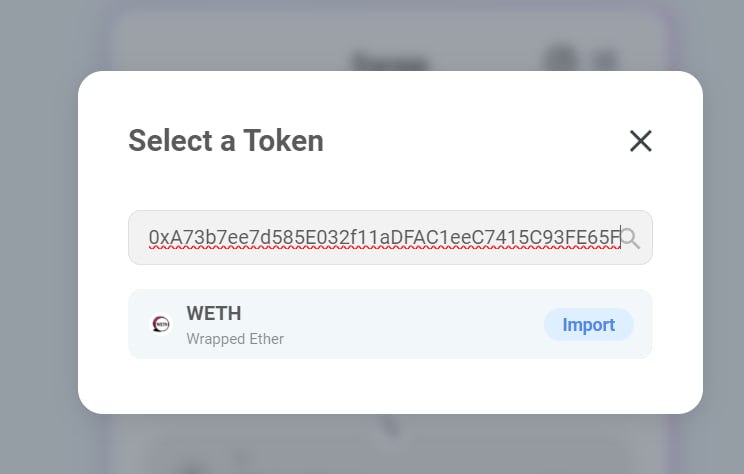
2. If you can't find the WETH token, paste this contract address and the WETH token will show up. Contract Address: 0xA73b7ee7d585E032f11aDFAC1eeC7415C93FE65F
 {% endhint %}
### Step 4. Add liquidity / Pool WeHMND/WETH
Now you are ready to provide Liquidity to Impossible Finance DEX. To do that, add WeHMND and WETH to the WeHMND/WETH pool on Impossible Finance DEX. In return, you will receive Liquidity Provider (LP) tokens that represent the value of your assets.
{% hint style="info" %}
For pooling, keep the same $ amount of WETH and WeHMND in your wallet address.
{% endhint %}
To [Add liquidity](https://link.humanode.io/trade/impossible-finance/add-liquidity/weth):
1. On the [Biostaker app](https://mainnet.biostaker.hmnd.app/biostaker/0xE6722d4b4864b585b338B3ceE667372cc50035cF), Click "Add Liquidity"\

{% endhint %}
### Step 4. Add liquidity / Pool WeHMND/WETH
Now you are ready to provide Liquidity to Impossible Finance DEX. To do that, add WeHMND and WETH to the WeHMND/WETH pool on Impossible Finance DEX. In return, you will receive Liquidity Provider (LP) tokens that represent the value of your assets.
{% hint style="info" %}
For pooling, keep the same $ amount of WETH and WeHMND in your wallet address.
{% endhint %}
To [Add liquidity](https://link.humanode.io/trade/impossible-finance/add-liquidity/weth):
1. On the [Biostaker app](https://mainnet.biostaker.hmnd.app/biostaker/0xE6722d4b4864b585b338B3ceE667372cc50035cF), Click "Add Liquidity"\

2. You'll be directed to the [Impossible Finance](https://link.humanode.io/trade/impossible-finance/add-liquidity/weth) Dapp. Enter the amount of WeHMND & WETH tokens you wish to add to the liquidity pool.\

3. Approve spending WETH & WeHMND on your wallet.\

4. Supply the approved amount to the liquidity pool.\

5. Confirm Supply and Add LP tokens WeHMND/WETH to your wallet.\

### Step 5. Biomap your EVM address and Stake LP tokens
Next, link your EVM address to your biometrics through a [private face scan](https://blog.humanode.io/data-privacy-and-protection-in-botbasher/) safeguarded by Humanode's cryptobiometric technology to prove you are a unique human. Unlike KYC, it doesn't require any personal information about you.
{% hint style="info" %}
Biomapping is essential as it ensures one account per person, making the staking process Sybil-resistant and the new reward scheme possible.
{% endhint %}
1. Visit the [Humanode Biostaker app](https://mainnet.biostaker.hmnd.app/), connect your wallet, and select 'BIOMAP' \

{% hint style="info" %}
1. Ensure you connect the wallet address you'll use for staking as biomapping is irreversible – an EVM address once linked to your biometrics cannot be reassigned to a different address.
2. Biomapping requires 2 eHMND + a network fee.
{% endhint %}
* Accept the Terms and Privacy Policy.\

* Complete the face scan\

* Connect Wallet and Submit Transaction. \

2. Once you've biomapped your address, stake WeHMND/WETH LP tokens on the Biostaker app. Just click Max in the `Tokens to stake` field, `APPROVE SPENDING`, Confirm in your wallet, and `STAKE`. You can view and manage your staked tokens and rewards in the Biostaker app.\

{% hint style="info" %}
***Congratulations! Your assets are now stake and you are earning passive income. Click on***** `Your Details` *****to learn more about your staked tokens and rewards.***
{% endhint %}
To learn more about Humanode's Nonlinear LP staking:
{% embed url="" %}
{% embed url="" %}